> ## Documentation Index
> Fetch the complete documentation index at: https://docs.movingbox.ai/llms.txt
> Use this file to discover all available pages before exploring further.

# Core Features

> Explore the key features that make MovingBox an essential tool for managing your home inventory

MovingBox offers a comprehensive set of features designed to make home inventory management effortless and efficient.

## AI-Powered Item Recognition

<Note>
  Your photos are processed securely and immediately deleted after analysis. No images are stored on our servers. All data transmission uses SSL encryption.
</Note>

<div className="grid grid-cols-2 gap-4">
  <div>
    <h3>Instant Item Identification</h3>

    <p>
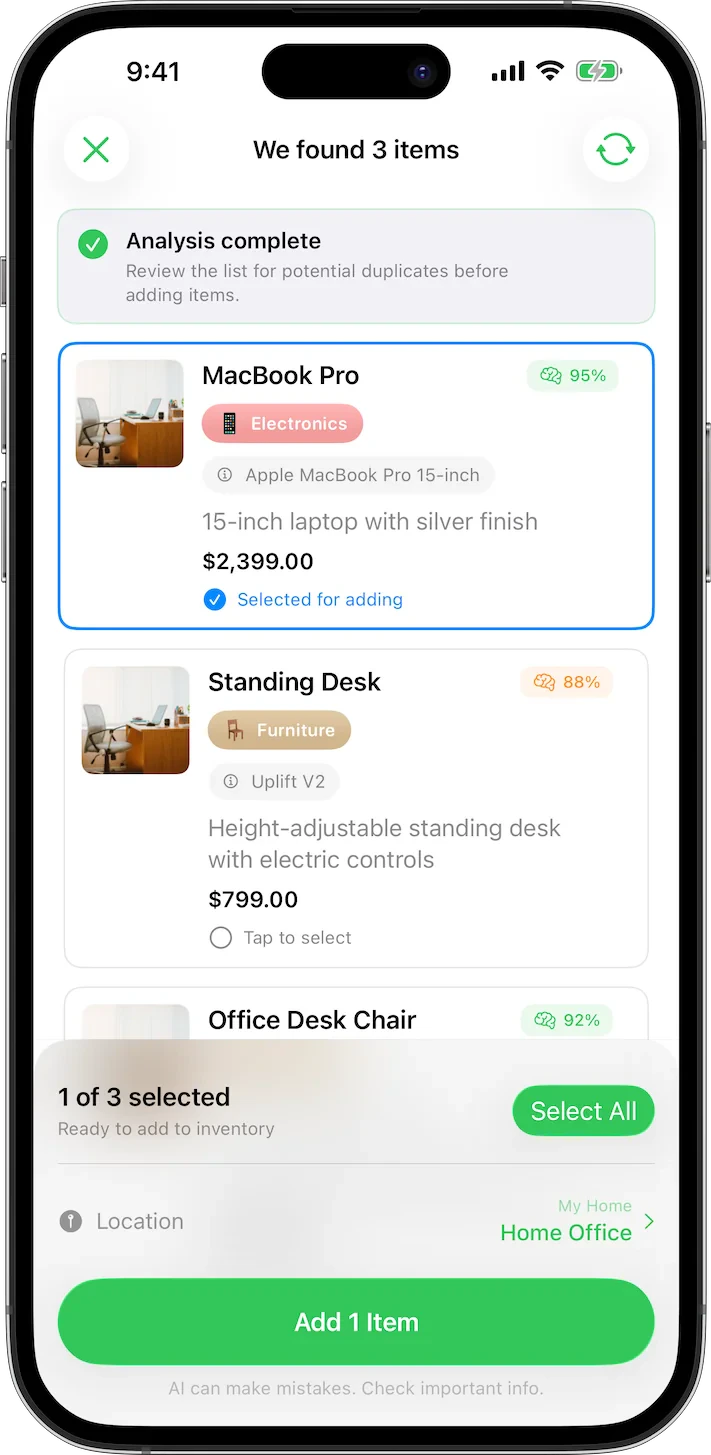
      Simply take a photo of any item, and let AI automatically identify and document it with remarkable accuracy. MovingBox is able to recognize many common properties:
    </p>

    <ul>
      <li>Item type</li>
      <li>Brand and model when visible</li>
      <li>Color and material</li>
      <li>Approximate age (when visually apparent)</li>
      <li><strong>Enhanced detail recognition</strong> with high-resolution processing</li>
      <li><strong>Multiple photos per item</strong> for comprehensive documentation</li>
    </ul>
  </div>

  <div className="flex items-start justify-center">
    <img src="https://mintcdn.com/mothersound/wh4_7oHXZQ3besnN/images/selection-light.webp?fit=max&auto=format&n=wh4_7oHXZQ3besnN&q=85&s=04da6bd10cb576aea379d5f2ac6b872f" alt="AI Recognition Demo" className="max-h-75 block dark:hidden" width="711" height="1455" data-path="images/selection-light.webp" />

    <img src="https://mintcdn.com/mothersound/wh4_7oHXZQ3besnN/images/selection-dark.webp?fit=max&auto=format&n=wh4_7oHXZQ3besnN&q=85&s=57cc6fd4377290fcf3250df0678a21c3" alt="AI Recognition Demo" className="max-h-75 hidden dark:block" width="711" height="1455" data-path="images/selection-dark.webp" />
  </div>
</div>

### Enhanced AI Analysis

* **High-Resolution Analysis**: Process images up to 1250x1250px for enhanced detail recognition
* **Multiple Photos Per Item**: Add up to 5 photos per item (free users get 1 photo per item) to capture different angles, receipts, and supporting documentation
* **Unlimited AI Scans**: No limits on AI image analysis

<Note>
  Enhanced AI Analysis requires a **MovingBox Pro** subscription.
</Note>

## Comprehensive Documentation

MovingBox doesn't just identify your items—it creates detailed records with 15+ new properties for complete inventory management:

<CardGroup cols={2}>
  <Card title="Detailed Descriptions" icon="file-lines">
    Get comprehensive descriptions of each item automatically generated by AI
  </Card>

  <Card title="Purchase Information" icon="receipt">
    Track purchase date, location, warranty expiration, and condition
  </Card>

  <Card title="Financial Data" icon="money-bill">
    Store replacement cost, depreciation rate, and detailed pricing information
  </Card>

  <Card title="Physical Properties" icon="ruler">
    Record dimensions, weight, color, and storage requirements
  </Card>

  <Card title="Moving Optimization" icon="truck">
    Set fragility level, moving priority, and destination room assignment
  </Card>

  <Card title="Document Attachments" icon="paperclip">
    Store documents like receipts, warranties, and important files
  </Card>
</CardGroup>

## Intelligent Organization

Keep your inventory organized with **Locations** (group by room or storage area) and **Labels** (categorize by type, condition, or custom classifications). Create unlimited locations and labels, filter and sort your items, and move items between locations and homes with ease. [Learn more about organizing your inventory →](/02-how-to/organize-items)

## Multiple Homes

Manage inventory across all your properties from a single app.

<CardGroup cols={2}>
  <Card title="Multiple Properties" icon="house">
    Add a vacation home, rental unit, investment property, or office — each with its own rooms, labels, and insurance policy.
  </Card>

  <Card title="All Inventory View" icon="magnifying-glass">
    Use "All Inventory" in the sidebar to search and browse items across every home at once.
  </Card>

  <Card title="Instant Switching" icon="arrow-right-arrow-left">
    Switch between homes from the sidebar. The dashboard and all views update instantly.
  </Card>

  <Card title="Per-Home Insurance" icon="shield">
    Each home tracks its own insurance policy, coverage details, and deductible separately.
  </Card>
</CardGroup>

<Note>
  Multiple Homes requires a **MovingBox Pro** subscription.
</Note>

[Learn how to manage multiple homes →](/02-how-to/customize-home-details)

## AI Video Analysis

Scan an entire room by recording a short video.

<CardGroup cols={2}>
  <Card title="Room Scanning" icon="video">
    Pan across a room and MovingBox extracts frames to identify every item automatically.
  </Card>

  <Card title="Review & Keep" icon="check">
    Review detected items one by one — keep what you want, skip the rest.
  </Card>
</CardGroup>

<Note>
  AI Video Analysis requires a **MovingBox Pro** subscription.
</Note>

[Learn how to use video analysis →](/02-how-to/work-with-videos)

## Household Collaboration

Invite a trusted person to edit your inventory alongside you.

<CardGroup cols={2}>
  <Card title="Full Edit Access" icon="users">
    Invited collaborators can add, edit, and delete items across all your homes.
  </Card>

  <Card title="iCloud Powered" icon="cloud">
    Sharing is built on iCloud — changes sync in real time across all devices.
  </Card>
</CardGroup>

<Note>
  Household Collaboration requires a **MovingBox Pro** subscription.
</Note>

[Learn how to share your inventory →](/02-how-to/share-and-collaborate)

## Cloud Synchronization

Keep your inventory safe and accessible:

* **iCloud Integration**: Seamlessly sync your data across all your iOS devices
* **Household Collaboration**: Invite trusted collaborators to edit your inventory together
* **End-to-End Encryption**: Your data remains secure and private
* **Automatic Backups**: Never worry about losing your inventory information
* **Offline Mode**: Continue using the app even without an internet connection

## Advanced Export & Reporting

Generate comprehensive reports with powerful new export capabilities:

<CardGroup cols={2}>
  <Card title="Selective Exports" icon="filter">
    Build focused reports by exporting only selected items
  </Card>

  <Card title="ZIP Archives" icon="file-zipper">
    Export CSV data with photos for insurance claims or moving companies
  </Card>

  <Card title="Professional Documentation" icon="file-contract">
    Generate comprehensive inventory reports with all new properties
  </Card>

  <Card title="CSV Export" icon="file-export">
    Export your inventory data to CSV format for use with other applications
  </Card>
</CardGroup>

## Powerful Bulk Operations

Manage your inventory more efficiently with new bulk operation capabilities:

* **Multi-Select Interface**: Select multiple items simultaneously with intuitive checkboxes
* **Bulk Actions**: Move, re-label, or delete multiple items at once
* **Smart Selection**: Select all items or filter selections by criteria
* **Batch Editing**: Update properties across multiple items efficiently